The Handwritten Order Form Problem
A client recently asked me whether we should add AI to read handwritten sales order forms from their field team. My answer was no — and I want to explain why, because that conversation gets to something a lot of businesses are getting wrong about AI right now.
We're in a moment where AI feels like the answer to everything. New tool? Add AI. Slow process? AI will fix it. Messy data? AI can handle it. But that reflex — reaching for AI first — skips a more important question: does this actually need AI, or can an automation do it better? Most of the time, it's the automation.
In theory, AI can read the forms. Computer vision has gotten remarkably good. But handwriting varies. Ink smudges. Forms get photographed at odd angles. A 7 looks like a 1. A product code gets cut off at the edge of the frame. And when AI misreads a quantity or a SKU on a sales order, that mistake flows straight into revenue. Sales orders aren't social media posts — there's no margin for "mostly right."
The answer wasn't "AI can't do this." The answer was: when AI makes a mistake here, the cost is too high to accept — and a human validator still needs to be in the loop anyway. So we didn't gain much by adding AI in the first place.
Automations Don't Hallucinate. AI Does.
This is the core distinction that gets lost in the AI hype: a well-built automation runs on logic. If a form is submitted, a record is created. If an expense exceeds a threshold, it routes to the right approver. If a customer is tagged as a distributor, they see distributor pricing. These outcomes are deterministic — the same input produces the same output, every time.
AI is probabilistic. It interprets, infers, and occasionally invents. And when it's wrong, it's usually confident about it.
- Deterministic — same input, same output
- Fails loudly — you know when it breaks
- No interpretation, no assumptions
- Best for: structured, rule-based, high-stakes processes
- Probabilistic — interprets and infers
- Fails silently — confident even when wrong
- Reads context, language, sentiment, patterns
- Best for: unstructured input, analysis, low-stakes interpretation
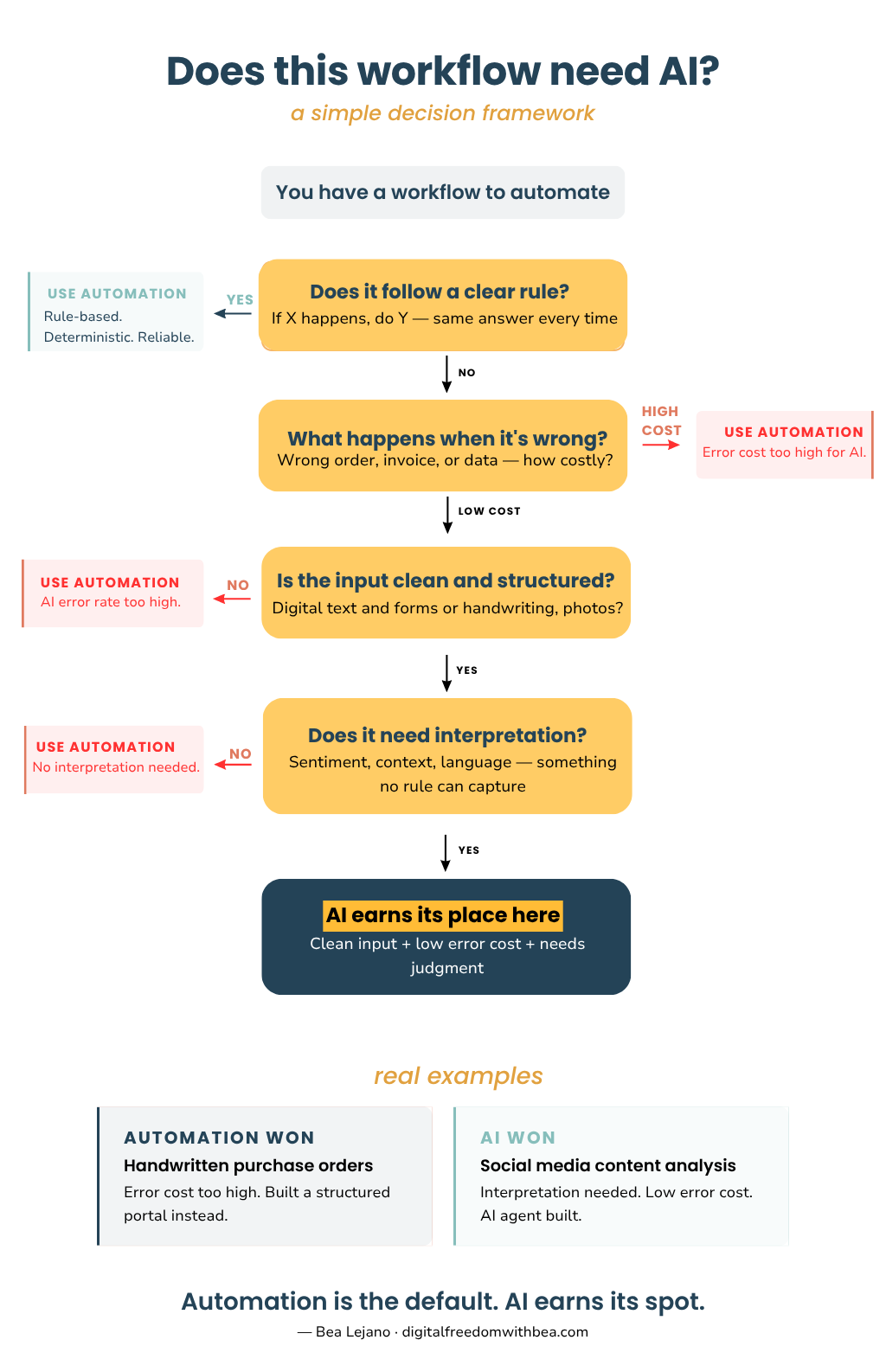
The 3 Questions to Ask Before Adding AI to Any Workflow
Before reaching for AI, run through these three questions. They'll tell you quickly whether AI is actually the right tool — or whether automation will get you there more reliably.
Can an automation handle this instead?
If the process follows a clear rule — if X happens, do Y — then automation is almost always the better choice. Structured data, defined logic, predictable inputs. Automations handle this without interpretation errors, without hallucinations, without variability.
Reserve AI for situations where the logic genuinely cannot be pre-defined — where the input is ambiguous, unstructured, or requires contextual judgment that a rule can't capture.
What happens when it's wrong?
This is the impact assessment question — and it's the one most people skip. For the handwritten sales order scenario: a mistake means a wrong quantity shipped, a revenue discrepancy, a client dispute. The downstream cost is significant.
Compare that to social media content analysis. If AI misclassifies a post's engagement tone, the marketing team reviews the weekly report and adjusts. The cost of a wrong answer is low. That changes the calculus entirely.
Is the input something AI reads reliably?
AI performs best on clean, structured inputs — well-formatted text, JSON data, clear digital copy, consistent language. It performs less reliably on ambiguous inputs: handwriting, inconsistent formatting, images with variable quality, intent that depends heavily on context.
This doesn't mean AI can't handle ambiguous inputs — it can, and it often does impressive work. But the error rate goes up, and you need to factor that into whether AI belongs in that specific workflow.
When AI Is Exactly Right: A Real Example
AI isn't the wrong tool — it's the wrong tool when applied without asking these questions. For a Philippine herbal brand, I built a multi-layered AI agent system that scrapes their Facebook posts weekly, analyzes each post for engagement performance and ICP alignment, and delivers a strategic content briefing to the marketing team every Monday morning, with no manual work required.
Can automation handle it? No — no rule-based system can evaluate whether a post resonates with B2B manufacturing buyers. What happens when it's wrong? The marketing team applies their own judgment; a misclassified post costs nothing. Is the input reliable for AI? Social posts are digital text and images — well within what AI handles well.
All three questions clear. AI is the right tool, and the system delivers weekly intelligence the team actually uses.
Start With Automation, Add AI Deliberately
The most robust operational systems I've built are primarily automation-driven, with AI layered in only where it genuinely earns its place. Automation handles the structured, high-volume, rules-based work — form submissions, data routing, approval chains, notifications, file organization. AI steps in for the interpretation layer — classifying open-ended email inquiries, analyzing content performance, generating summaries from unstructured input.
When you flip that relationship — when you reach for AI first and ask it to do work a structured automation could handle more reliably — you introduce variability into processes that don't need it. You add cost. You add a validation layer that didn't exist before. And you create a system that looks impressive until the day it quietly gets something wrong.
The question isn't "can AI do this?" — the answer to that is almost always yes. The question is "should AI do this, given what happens when it gets it wrong?" Start with automation. Add AI where interpretation genuinely adds value and where imperfect answers are acceptable. That's how you build systems that actually hold up.
Running on manual workarounds?
One discovery call and you'll know what's worth automating in your operation, what isn't, and what a working system would look like.